New New in version 1.1

MWVT EventTimer

The operator sees everything. The stage sees only what matters.

The free stage timer for events, conferences and trade fairs: controlled from your laptop or a Stream Deck, with messages to the stage – so everyone stays on schedule.

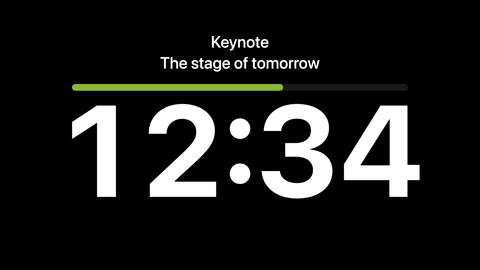
MWVT EventTimer Stageview with a large countdown and the label “Keynote”
Stageview – a large countdown, optionally with the agenda item's label.
€0
Free – no account, no sign-up
Offline
Runs locally on your own network – no cloud, no tracking
Mac & Windows
macOS 12+ · Windows 10/11 (64-bit)
Features

Simple. Clear. Reliable.

Born from planning, technology and on-site support for events: MWVT EventTimer gives everyone the same time – readable at a glance.

See exactly what's showing on stage

No guesswork – the preview mirrors the stage 1:1.

The operator window shows a true preview of the stage display – number, message, progress bar and overtime, exactly as it appears out front. A status line tells you at any moment whether the timer is ready, running, paused or in overtime. What you see in the preview is what the audience sees.

  • Two-window system (operator + stage display)
  • true live preview (WYSIWYG)
  • shows number, message, progress bar and overtime exactly as out front
  • status line: Ready, Running, Paused, Overtime, Stopped

Any phone becomes a stage display

Scan the QR – your phone is now a stage display.

No second computer, no install, no cable. Show a QR code, the speaker or operator scans it with a phone – and instantly sees the timer live and full-screen. The same works with a tablet or a second laptop on the same Wi-Fi. If the network drops briefly, the display keeps running and re-syncs itself the moment the connection is back. Optionally protected with an access code.

  • Stage display over the network
  • QR-code link
  • multiple devices at once (phone, tablet, laptop, smart TV, media player)
  • runs in the browser, no app install
  • auto re-sync after Wi-Fi drop
  • optional access code

Count down to a time of day New

The break ends at 2:30 pm – the timer does the maths.

Instead of a duration, just set the time a segment should end – by typing it or right on the analog clock. On start, the timer works out the remaining time to the second and then runs as usual: pause, add time and overtime all work the same. Ideal for breaks, doors and fixed broadcast times.

  • “Duration | Until time” switch
  • target time by typing or on the analog clock
  • accurate to the second
  • then a normal countdown with pause and quick add

Cue the speaker without a word New

“Please wrap up” – without saying a word.

Type a message and send it to the stage – it appears large and readable, with the time still visible below. Save your common cues once and toggle them on or off with a click. If the speaker isn't looking, Flash makes the stage blink brightly three times – time and message stay readable.

  • free text live to the stage
  • savable message presets
  • one-click on/off
  • live editing
  • text auto-scales for readability
  • Flash: stage blinks brightly three times (also via Companion)

When time is running short New

Warning colours you can see from the stage – and one click for more time.

If you like, the number changes colour in two stages as time runs short – you set the thresholds and colours yourself, green-screen friendly too. Speaker needs longer? Add +1, +2 or +5 minutes or take one away with −1. If time runs out, the timer keeps counting in blinking red overtime.

  • optional warning and critical stage (share of total time)
  • custom colours, green-screen friendly
  • quick add −1 / +1 / +2 / +5 min
  • start/pause in one button
  • overtime alarm (blinking red overtime)
  • hours from 60 minutes on (1:30:00)

Stream Deck control via Bitfocus Companion New

Ready-made templates for Stream Deck XL and MK.2.

If you work with a Stream Deck, you're set up in seconds: there's a ready-made Companion template for both Stream Deck XL and MK.2. Start, pause, next, add time, load presets, messages and Flash – all on physical keys, with status colours right on the deck. The timer slots straight into your pro workflow.

  • Bitfocus Companion integration
  • templates for Stream Deck XL and MK.2
  • start / pause / next / reset / stop
  • add time, load presets
  • send messages, Flash
  • keys show status and the active message

More features

Download

Download MWVT EventTimer

Free. No account, no registration — just download and go.

  • Mac: notarized by Apple
  • No tracking
  • SHA-256 checksums to verify
macOS
Version 1.1.2 · November 2026
  • macOS 12 Monterey or later
  • Apple Silicon & Intel
Intel Mac .dmg · 118.4 MB
Windows
Version 1.1.2 · November 2026
  • Windows 10/11 (64-bit)
  • Version 1903 or later
Download for Windows .exe · 99.3 MB
Checksum (SHA-256) to verify
MWVT EventTimer-1.1.2-arm64.dmg
4426bf1be3e784d802d13befb5b0fbfdb1a86388475a29af819e5d02e8b3215d
MWVT EventTimer-1.1.2.dmg
9631858e3c38c49ab174bad4e5e0bdbc2fbe11cc3abcf2f554dffaca2ff74df6
MWVT EventTimer Setup 1.1.2.exe
ee59ea3bf5cb6b83fdfc0fc949aa8921c8d4667ba980cb7d2f466264fd3b95b4

macOS: shasum -a 256 "MWVT EventTimer-1.1.2-arm64.dmg" · Windows (PowerShell): Get-FileHash "MWVT EventTimer Setup 1.1.2.exe"

Note for Windows: On first launch, SmartScreen may show a security prompt because the app isn't signed with a Windows certificate yet – it's unmodified from MWVT-Event. The Mac version is signed with an Apple Developer ID and notarized by Apple (no warning). See the steps in the guide →

Templates for Bitfocus Companion
Ready-made templates for Stream Deck XL and MK.2 – import into Companion and go.

Free for private and commercial use. Subject to the terms of use.

New to the app? View the full guide →
Background image: AI-generated
FAQ

Frequently asked

Who is MWVT EventTimer for?

As a stage timer and conference timer, MWVT EventTimer is suited for anyone organising events with time-critical contributions — conferences, panels, trade shows, services and trainings.

What does MWVT EventTimer cost?

MWVT EventTimer is free. No subscription, no registration, no hidden fees.

Do I need two screens?

For the full feature set yes. One screen is enough for testing though — both views can be displayed on a single screen.

Can I show the countdown on stage?

Yes. The Stageview shows the countdown large on a second monitor or via browser on the local network — on stage, a tablet, smart TV or second laptop.

Does it run on Mac and Windows?

Yes, MWVT EventTimer is a native app for both macOS and Windows.

Does the timer work without internet?

Yes. MWVT EventTimer runs entirely locally on your computer and your own network — no cloud, no sign-in. So the stage timer works reliably even in venues with no internet at all.

What happens when time runs over?

After the speaking time runs out, the display continues with a minus sign and flashes red/white to clearly mark the overtime.

What's new in version 1.1?

Version 1.1 adds, among other things, a countdown to a time of day, warning stages with custom colours, up to 50 labelled presets with “Next ▸” for the next agenda item, Flash, and Companion templates for Stream Deck XL and MK.2. All changes are listed on the “What's new” page.

Free for Mac and Windows.

No account, no registration.

Support

Buy me a coffee

EventTimer is free and will stay free. If it saved your show, I'd be happy about a coffee or an after-show beer – it keeps development going.

Voluntary, nothing in return. Payment is handled by PayPal.

Newsletter

New versions straight to your inbox

Be the first to hear about updates, new features and new programs – in German and English. No tracking, unsubscribe with one click.